Free International Shipping. No Minimum Purchase Required*

How to find us  |  Gift vouchers

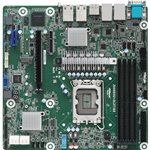
ASRock Mainboard Z690D4U-2L2T/G5 micro-ATX Sockel 1700 DDR5-only Single

  • Intel LGA 1700 Intel® Celeron®, Intel® Pentium®
  • Server micro ATX Intel Z690
  • DDR5-SDRAM 4 DIMM
  • HDD & SSD M.2, SATA III
  • ASPEED AST2600
  • BIOS type: AMI ACPI version: 6.4

1,104.05

Product information

  • Intel LGA 1700 Intel® Celeron®, Intel® Pentium®
  • Server micro ATX Intel Z690
  • DDR5-SDRAM 4 DIMM
  • HDD & SSD M.2, SATA III
  • ASPEED AST2600
  • BIOS type: AMI ACPI version: 6.4

Product Specifications

Specs

Processor
Processor manufacturer
The manufacturer that produced the processor.
Intel
Processor socket
Mechanical component(s) that provides mechanical and electrical connections between a microprocessor and a printed circuit board (PCB). This allows the processor to be replaced without soldering.
LGA 1700
Compatible processor series
A processor which is compatible with this device, belongs to a 'series' which is part of 'family' e.g Celeron D, Celeron G, Celeron M, or, in some cases, is the same as 'family'.
Intel® Celeron®, Intel® Pentium®
Maximum number of SMP processors
1
Memory
Supported memory types
Types of memory which can be used with the product.
DDR5-SDRAM
Number of memory slots
4
Memory slots type
A memory slot, also known as a memory socket or RAM slot, is what allows computer memory (RAM) to be inserted into the computer. Depending on the motherboard, there will usually be 2 to 4 memory slots (sometimes more on high-end motherboards). The most common types of RAM are SDRAM and DDR for desktop computers and SODIMM for laptop computers, each having various types and speeds.
DIMM
ECC сompatibility
Non-ECC
Storage controllers
Supported storage drive types
The type of storage drives the device is compatible with.
HDD & SSD
Supported storage drive interfaces
M.2, SATA III
Graphics
Graphics card family
ASPEED
Graphics card
AST2600
Internal I/O
USB 2.0 connectors
The end of a cable with a USB 2.0 connector. USB 2.0 was released in April 2000 (now called "Hi-Speed"), adding higher maximum signaling rate of 480 Mbit/s (effective throughput up to 35 MB/s or 280 Mbit/s), in addition to the "USB 1.x Full Speed" signaling rate of 12 Mbit/s. USB 2.0 connectors are usually colored black.
2
USB 3.2 Gen 1 (3.1 Gen 1) connectors
This is a connector (normally attached to a cable) for USB 3.0. USB 3.0 is the second major revision of the Universal Serial Bus (USB) standard for computer connectivity. First introduced in 2008, USB 3.0 adds a new transfer mode called "SuperSpeed," (distinguishable from USB 2.0 by either the blue colour of the port or the initials SS) capable of transferring data at up to 5Gbit/s—more than ten times as fast as the 480 Mbit/s top speed of USB 2.0.
2
Number of SATA III connectors
Serial ATA (Advanced Technology Attachment) (SATA) is a computer bus interface that connects host bus adapters to mass storage devices such as hard disk drives and optical drives. SATA III (revision 3.x) interface, formally known as SATA 6Gb/s, is a third generation SATA interface running at 6.0Gb/s. The bandwidth throughput, which is supported by the interface, is up to 600MB/s. This interface is backwards compatible with SATA 3 Gb/s interface.
8
Front panel connector
ATX Power connector (24-pin)
TPM connector
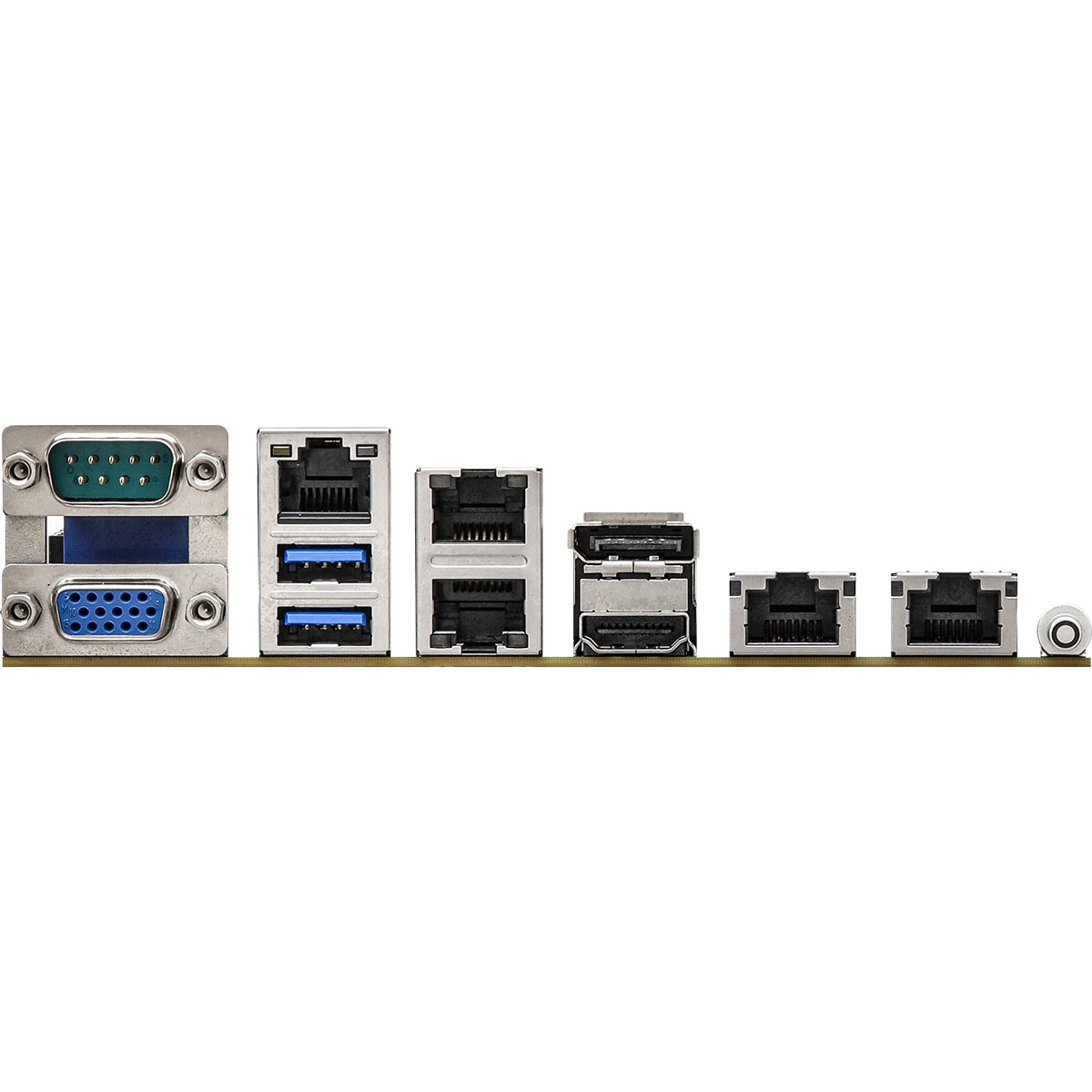
Rear panel I/O ports
USB 3.2 Gen 1 (3.1 Gen 1) Type-A ports quantity
2
Ethernet LAN (RJ-45) ports
Number of Ethernet LAN (RJ-45) ports (connecting interfaces) in the device. Ethernet LAN (RJ-45) ports allow a computer to connect to the ethernet.
4
IPMI LAN (RJ-45) port
VGA (D-Sub) ports quantity
Number of VGA (D-Sub) ports (connecting interfaces) in the device. The VGA (D-Sub) connector is a 15 pin connector between a computer and a monitor. It was first introduced in 1987 by IBM.
1
HDMI ports quantity
The number of sockets (ports) for HDMI connections. HDMI (High-Definition Multimedia Interface) is a compact audio/video interface for transferring uncompressed video data and compressed/uncompressed digital audio data from a HDMI-compliant device ("the source device") to a compatible computer monitor, video projector, digital television, or digital audio device. HDMI is a digital replacement for existing analog video standards.
1
DisplayPorts quantity
Number of DisplayPorts. A DisplayPort is a digital display interface developed by the Video Electronics Standards Association (VESA). The interface is primarily used to connect a video source to a display device such as a computer monitor, though it can also be used to carry audio, USB, and other forms of data.
1
Rear panel I/O ports
Serial ports quantity
The number of serial ports in a computer or peripheral. A serial port is a serial communication physical interface through which information transfers in or out one bit at a time. The term "serial port" usually identifies hardware more or less compliant to the RS-232 standard, intended to interface with a modem or with a similar communication device. In modern computers and peripherals, serial ports have largely been replaced by USBs and other interfaces.
1
Network
Ethernet LAN
An Ethernet LAN (Local Area Network) interface is present, for a wired conection via a cable.
LAN controller
Intel I210, Intel® X710
Wi-Fi
Popular technology that allows an electronic device to exchange data or connect to the internet wirelessly using radio waves.
Features
Motherboard chipset
The chipset connects the microprocessor to the rest of the motherboard.
Intel Z690
PC health monitoring
Fan, Temperature
Component for
What this product is used as a part of (component for).
Server
Motherboard form factor
Design of the motherboard (ATX, BTX etc).
micro ATX
Motherboard chipset family
The category of motherboard chipset e.g. Intel, AMD.
Intel
Windows operating systems supported
Windows vesions wich can be used with the device.
Windows 10 x64, Windows 11 x64
Expansion slots
PCI Express x1 (Gen 3.x) slots
1
PCI Express x4 (Gen 4.x) slots
1
PCI Express x16 (Gen 5.x) slots
1
Number of M.2 (M) slots
1
BIOS
BIOS type
The BIOS (Basic Input/Output System) initializes and tests system hardware components, and loads a bootloader or an operating system from a mass memory device. The BIOS additionally provides abstraction layer for the hardware, i.e. a consistent way for application programs and operating systems to interact with the keyboard, display, and other input/output devices. There are several types of BIOS, including the motherboard ROM BIOS, video BIOS, drive controller BIOS, network adapter BIOS, and SCSI adapter BIOS.
AMI
ACPI version
6.4
System Management BIOS (SMBIOS) version
2.8
Operational conditions
Storage temperature (T-T)
The minimum and maximum temperatures at which the product can be safely stored.
-40 - 70 °C
Operating temperature (T-T)
The minimum and maximum temperatures at which the product can be safely operated.
10 - 35 °C
Operating relative humidity (H-H)
20 - 90%
Weight & dimensions
Width
The measurement or extent of something from side to side.
244 mm
Depth
The distance from the front to the back of something.
244 mm

Specs

Processor
Processor manufacturer
The manufacturer that produced the processor.
Intel
Processor socket
Mechanical component(s) that provides mechanical and electrical connections between a microprocessor and a printed circuit board (PCB). This allows the processor to be replaced without soldering.
LGA 1700
Compatible processor series
A processor which is compatible with this device, belongs to a ‘series’ which is part of ‘family’ e.g Celeron D, Celeron G, Celeron M, or, in some cases, is the same as ‘family’.
Intel® Celeron®, Intel® Pentium®
Maximum number of SMP processors
1
Memory
Supported memory types
Types of memory which can be used with the product.
DDR5-SDRAM
Number of memory slots
4
Memory slots type
A memory slot, also known as a memory socket or RAM slot, is what allows computer memory (RAM) to be inserted into the computer. Depending on the motherboard, there will usually be 2 to 4 memory slots (sometimes more on high-end motherboards). The most common types of RAM are SDRAM and DDR for desktop computers and SODIMM for laptop computers, each having various types and speeds.
DIMM
ECC сompatibility
Non-ECC
Storage controllers
Supported storage drive types
The type of storage drives the device is compatible with.
HDD & SSD
Supported storage drive interfaces
M.2, SATA III
Graphics
Graphics card family
ASPEED
Graphics card
AST2600
Internal I/O
USB 2.0 connectors
The end of a cable with a USB 2.0 connector. USB 2.0 was released in April 2000 (now called “Hi-Speed”), adding higher maximum signaling rate of 480 Mbit/s (effective throughput up to 35 MB/s or 280 Mbit/s), in addition to the “USB 1.x Full Speed” signaling rate of 12 Mbit/s. USB 2.0 connectors are usually colored black.
2
USB 3.2 Gen 1 (3.1 Gen 1) connectors
This is a connector (normally attached to a cable) for USB 3.0. USB 3.0 is the second major revision of the Universal Serial Bus (USB) standard for computer connectivity. First introduced in 2008, USB 3.0 adds a new transfer mode called “SuperSpeed,” (distinguishable from USB 2.0 by either the blue colour of the port or the initials SS) capable of transferring data at up to 5Gbit/s—more than ten times as fast as the 480 Mbit/s top speed of USB 2.0.
2
Number of SATA III connectors
Serial ATA (Advanced Technology Attachment) (SATA) is a computer bus interface that connects host bus adapters to mass storage devices such as hard disk drives and optical drives. SATA III (revision 3.x) interface, formally known as SATA 6Gb/s, is a third generation SATA interface running at 6.0Gb/s. The bandwidth throughput, which is supported by the interface, is up to 600MB/s. This interface is backwards compatible with SATA 3 Gb/s interface.
8
Front panel connector
ATX Power connector (24-pin)
TPM connector
Rear panel I/O ports
USB 3.2 Gen 1 (3.1 Gen 1) Type-A ports quantity
2
Ethernet LAN (RJ-45) ports
Number of Ethernet LAN (RJ-45) ports (connecting interfaces) in the device. Ethernet LAN (RJ-45) ports allow a computer to connect to the ethernet.
4
IPMI LAN (RJ-45) port
VGA (D-Sub) ports quantity
Number of VGA (D-Sub) ports (connecting interfaces) in the device. The VGA (D-Sub) connector is a 15 pin connector between a computer and a monitor. It was first introduced in 1987 by IBM.
1
HDMI ports quantity
The number of sockets (ports) for HDMI connections. HDMI (High-Definition Multimedia Interface) is a compact audio/video interface for transferring uncompressed video data and compressed/uncompressed digital audio data from a HDMI-compliant device (“the source device”) to a compatible computer monitor, video projector, digital television, or digital audio device. HDMI is a digital replacement for existing analog video standards.
1
DisplayPorts quantity
Number of DisplayPorts. A DisplayPort is a digital display interface developed by the Video Electronics Standards Association (VESA). The interface is primarily used to connect a video source to a display device such as a computer monitor, though it can also be used to carry audio, USB, and other forms of data.
1
Rear panel I/O ports
Serial ports quantity
The number of serial ports in a computer or peripheral. A serial port is a serial communication physical interface through which information transfers in or out one bit at a time. The term “serial port” usually identifies hardware more or less compliant to the RS-232 standard, intended to interface with a modem or with a similar communication device. In modern computers and peripherals, serial ports have largely been replaced by USBs and other interfaces.
1
Network
Ethernet LAN
An Ethernet LAN (Local Area Network) interface is present, for a wired conection via a cable.
LAN controller
Intel I210, Intel® X710
Wi-Fi
Popular technology that allows an electronic device to exchange data or connect to the internet wirelessly using radio waves.
Features
Motherboard chipset
The chipset connects the microprocessor to the rest of the motherboard.
Intel Z690
PC health monitoring
Fan, Temperature
Component for
What this product is used as a part of (component for).
Server
Motherboard form factor
Design of the motherboard (ATX, BTX etc).
micro ATX
Motherboard chipset family
The category of motherboard chipset e.g. Intel, AMD.
Intel
Windows operating systems supported
Windows vesions wich can be used with the device.
Windows 10 x64, Windows 11 x64
Expansion slots
PCI Express x1 (Gen 3.x) slots
1
PCI Express x4 (Gen 4.x) slots
1
PCI Express x16 (Gen 5.x) slots
1
Number of M.2 (M) slots
1
BIOS
BIOS type
The BIOS (Basic Input/Output System) initializes and tests system hardware components, and loads a bootloader or an operating system from a mass memory device. The BIOS additionally provides abstraction layer for the hardware, i.e. a consistent way for application programs and operating systems to interact with the keyboard, display, and other input/output devices. There are several types of BIOS, including the motherboard ROM BIOS, video BIOS, drive controller BIOS, network adapter BIOS, and SCSI adapter BIOS.
AMI
ACPI version
6.4
System Management BIOS (SMBIOS) version
2.8
Operational conditions
Storage temperature (T-T)
The minimum and maximum temperatures at which the product can be safely stored.
-40 – 70 °C
Operating temperature (T-T)
The minimum and maximum temperatures at which the product can be safely operated.
10 – 35 °C
Operating relative humidity (H-H)
20 – 90%
Weight & dimensions
Width
The measurement or extent of something from side to side.
244 mm
Depth
The distance from the front to the back of something.
244 mm

Customer Reviews

Add a review
ASRock Mainboard Z690D4U-2L2T/G5 micro-ATX Sockel 1700 DDR5-only Single ASRock Mainboard Z690D4U-2L2T/G5 micro-ATX Sockel 1700 DDR5-only Single
Rating*
0/5
* Rating is required
Your review
* Review is required
Name
* Name is required
0.0
Based on 0 reviews
5 star
0%
4 star
0%
3 star
0%
2 star
0%
1 star
0%
0 of 0 reviews

Sorry, no reviews match your current selections

Accessories

Questions & Answers

Q & A

Ask a question
You must be logged in to ask a question Log In
There are no questions yet

Delivery & Returns

We aim to deliver your order quickly and safely.

  • Standard delivery: 3–6 working days within Ireland.

  • Click & Collect: Available free from our Clonakilty store (you will be notified when your order is ready).

  • If an item is out of stock, we will contact you with an updated delivery timeframe or alternative options.

  • Delivery charges are calculated at checkout based on order size and destination.

Warranty

All products sold by Computronic come with a standard manufacturer’s warranty. Warranty length and coverage may vary by product and brand. For most electronics, this is 12 months from the date of purchase. Please keep your receipt or order confirmation as proof of purchase.

  • Warranty covers manufacturing defects and hardware faults.

  • It does not cover accidental damage, misuse, or normal wear and tear.

  • For warranty claims, please contact us or bring the product to our Clonakilty store.

Buy with

Whats in the box