Free International Shipping. No Minimum Purchase Required*

How to find us  |  Gift vouchers

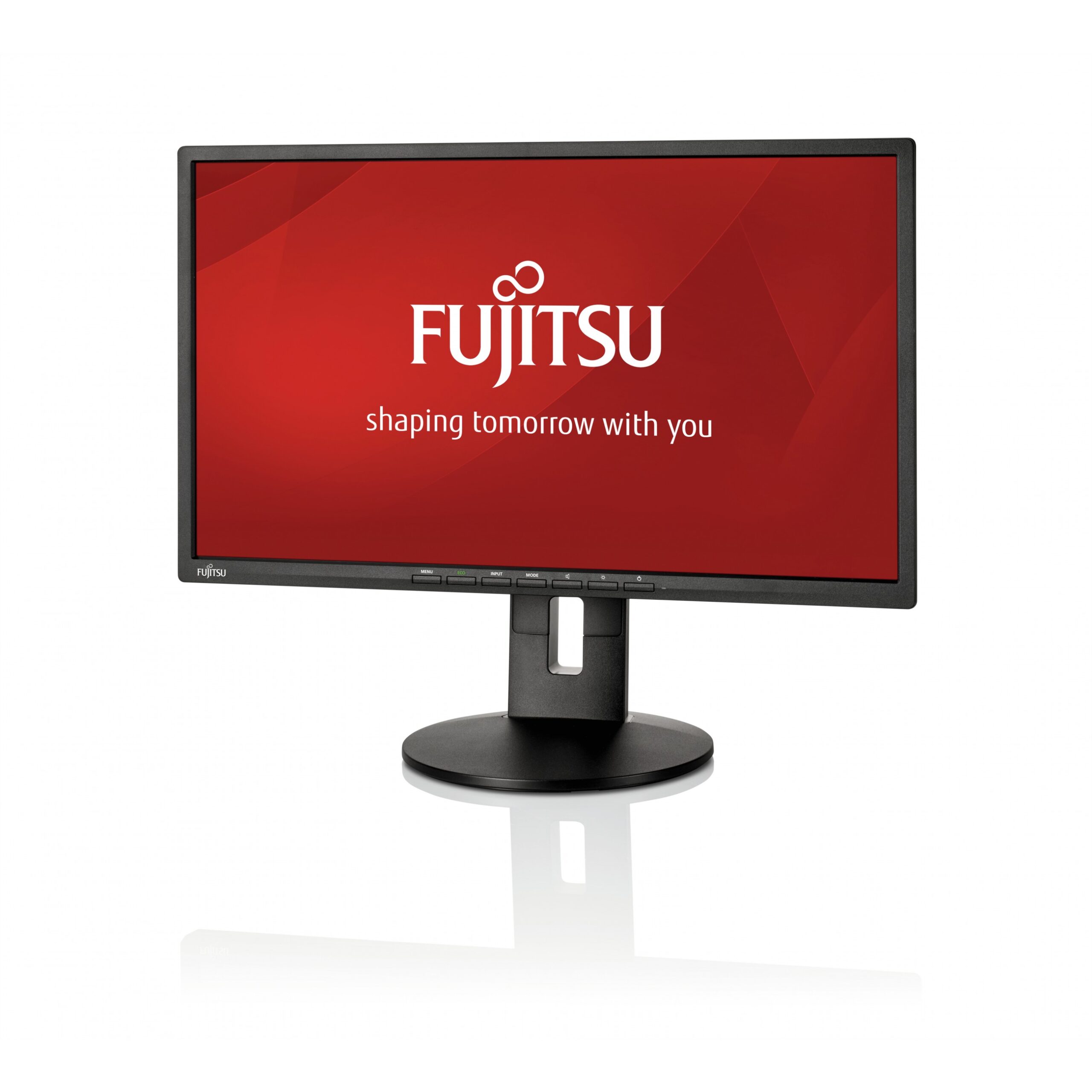
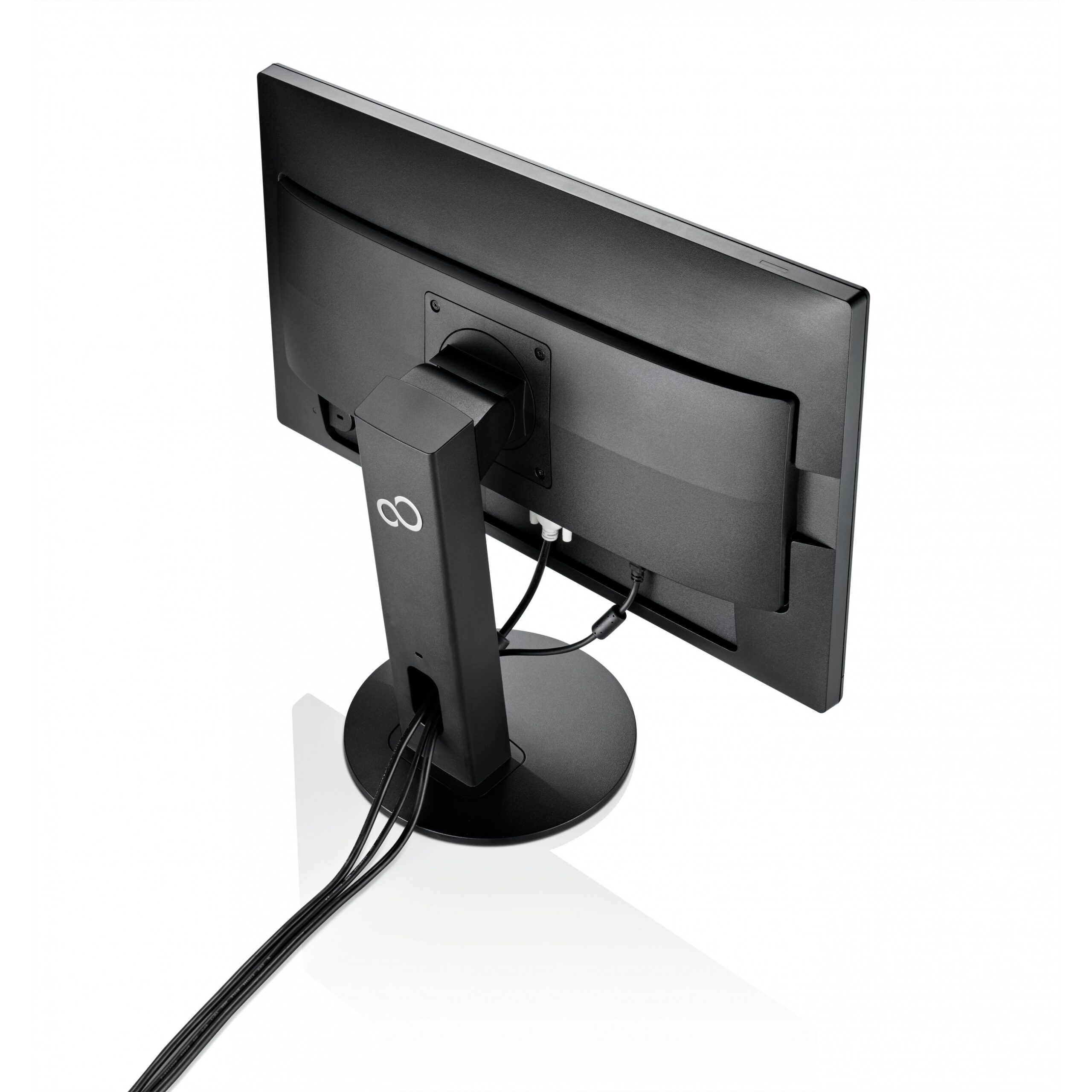
54,6cm / 21,5” (1920×1080) Fujitsu B22-8 TS Pro 16:9 5ms IPS DVI-D VGA DisplayPort VESA Pivot Speaker Full HD -LED- Black

  • 54.6 cm (21.5″) LED IPS
  • Full HD 1920 x 1080 pixels 16:9
  • 10 ms 250 cd/m² 1000:1
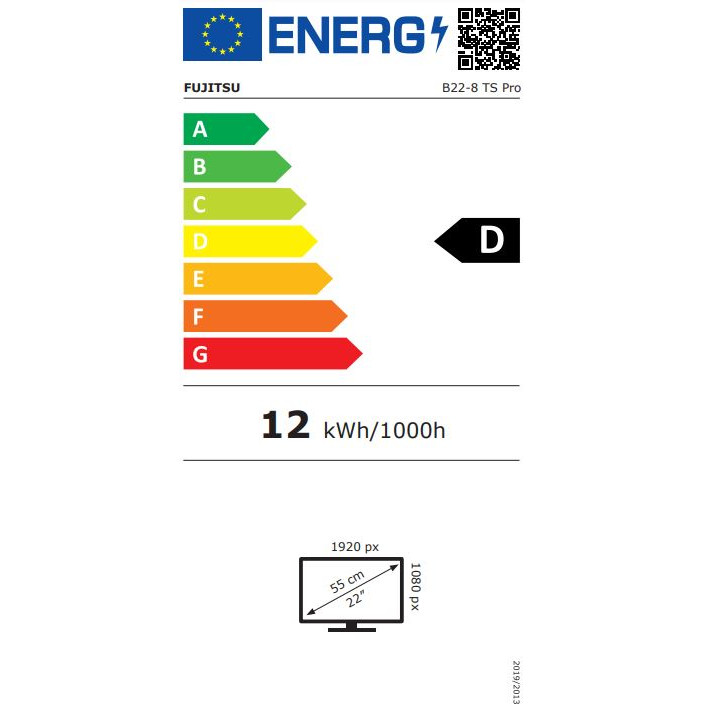
  • D 12 kWh

98.72

Product information

  • 54.6 cm (21.5″) LED IPS
  • Full HD 1920 x 1080 pixels 16:9
  • 10 ms 250 cd/m² 1000:1
  • D 12 kWh

Product Specifications

Specs

Display
Display diagonal
Size of the display for this product, measured diagonally, usually in inches.
54.6 cm (21.5")
Display resolution
The number of distinct pixels in each dimension that can be displayed. It is usually quoted as width × height, with the units in pixels: for example, "1024 × 768" means the width is 1024 pixels and the height is 768 pixels. The higher the number of pixels, the sharper the image.
1920 x 1080 pixels
HD type
Type of supported High Definition (e.g. Full HD, 4K Ultra HD).
Full HD
Native aspect ratio
The aspect ratio is the ratio of the width of an image to its height. The native aspect ratio is the one which the projector/display is particularly designed for. Images shown in native aspect ratio will utilize the entire resolution of the display and achieve maximum brightness. Images shown in other than native aspect ratio will always have less resolution and less brightness than images shown in native aspect ratio.
16:9
Display technology
The technology used in the display e.g. plasma, LED.
LED
Panel type
IPS
Touchscreen
A screen of a laptop, smartphone, etc., that responds to touch so you can control the interface using your fingers.
Display brightness (typical)
Display brightness, measured by its Luminance, presented as a figure in nits. Typical brightness ratings for monitors range from 250 to 350 nits with a target value of between 80 to 120 nits being suitable for most displays in a normal viewing environment.
250 cd/m²
Response time
The response time is the time difference between the moment that a source (for example a video card) sends a signal and that equipment (for example a monitor) receives or display the signal. (Used abbreviations: R/F = Rise and Fall.)
10 ms
Display surface
Matt
Screen shape
Flat
Supported graphics resolutions
The graphic resolutions that can be displayed by the device. The graphic resolution describes the width and height dimensions of a display, such as a computer monitor, measured in pixels.
640 x 480 (VGA), 800 x 600 (SVGA), 1024 x 768 (XGA), 1280 x 1024 (SXGA), 1280 x 720 (HD 720), 1440 x 900, 1680 x 1050 (WSXGA+)
Aspect ratio
The aspect ratio is the ratio of the width of a shape to its height. For example, 4:3 is common for standard displays and 16:9 is the ratio for Widescreen TV.
16:9
Contrast ratio (typical)
The difference in light intensity between the brightest white and the darkest black.
1000:1
Contrast ratio (dynamic)
A property of a display system, defined as the ratio of the luminance of the brightest color (white) to that of the darkest color (black) that the system is capable of producing.
20000000:1
Viewing angle, horizontal
Maximum horizontal angle at which a display can be viewed with acceptable visual performance.
178°
Viewing angle, vertical
Maximum vertical angle at which a display can be viewed with acceptable visual performance.
178°
Display number of colours
16.78 million colours
Pixel pitch
This is the parameter of a picture tube, which specifies the shortest distance between two dots of the same colour. The principle is: the smaller the dot pitch, the better sharpness of image.
0.248 x 0.248 mm
Digital horizontal frequency
30 - 82 kHz
Digital vertical frequency
56 - 76 Hz
DDC/CI
Colour gamut standard
sRGB
3D
The device can be used with 3D technology.
Performance
NVIDIA G-SYNC
AMD FreeSync
The product includes AMD Freesync Technology for the dynamic synchronization of the graphic card and the monitor in order to avoid screen tearing.
Multimedia
Built-in speaker(s)
The device contains speaker(s) to produce sound.
Built-in camera
The product has an integrated camera.
Design
Product colour
The colour e.g. red, blue, green, black, white.
Black
Ports & interfaces
Built-in USB hub
Whether or not the device features a USB hub to connect more than one other device via USB.
USB hub version
2.0
USB upstream port type
USB Type-B
Number of upstream ports
1
USB Type-A downstream ports quantity
2
VGA (D-Sub) ports quantity
Number of VGA (D-Sub) ports (connecting interfaces) in the device. The VGA (D-Sub) connector is a 15 pin connector between a computer and a monitor. It was first introduced in 1987 by IBM.
1
DVI port
Digital Visual Interface (DVI) is a video display interface to connect a video source to a display device, such as a computer monitor.
DVI-D ports quantity
This is the amount of DVI-I interfaces. Digital Visual Interface (DVI) is a video display interface developed by the Digital Display Working Group (DDWG). The digital interface is used to connect a video source to a display device, such as a computer monitor. DVI-D means DVI digital, which means it can only support digital, but not analog.
1
HDMI
HDMI (High-Definition Multimedia Interface) is a compact audio/video interface for transferring uncompressed video data and compressed/uncompressed digital audio data from a HDMI-compliant device ("the source device") to a compatible computer monitor, video projector, digital television, or digital audio device. HDMI is a digital replacement for existing analog video standards.
DisplayPorts quantity
Number of DisplayPorts. A DisplayPort is a digital display interface developed by the Video Electronics Standards Association (VESA). The interface is primarily used to connect a video source to a display device such as a computer monitor, though it can also be used to carry audio, USB, and other forms of data.
1
Audio input
The type of audio input that the device requires, and the connection needed.
Audio output
The type of audio output that the device produces, and the connector(s).
Headphone out
The socket for connecting headphones to the device.
Headphone outputs
Number of sockets /ports where headphones are connected.
1
Headphone connectivity
How headphones connect to a device e.g. wirelessly or via a cable and connector.
3.5 mm
HDCP
High-bandwidth Digital Content Protection (HDCP) is a form of digital copy protection to prevent copying of digital audio and video content as it travels across connections.
Ports & interfaces
DC-in jack
The socket/plug where the DC electricity supply connects to the device.
Ergonomics
VESA mounting
Cable lock slot
Holes on the edge of devices through which a cable lock can be passed, so the device can be locked to a desk etc.
Cable lock slot type
Kensington
Height adjustment
The part of the device that can be adjusted to change the height.
Adjustable height (max)
15 cm
Pivot
Swivelling
Tilt adjustment
The tilt, which means the angle at which the device is pointing (up or down), can be changed.
Tilt angle range
-5 - 35°
Power
Energy efficiency class (SDR)
D
Energy consumption (SDR) per 1000 hours
12 kWh
Power consumption (max)
The maximum amount of power used by the device.
20 W
Power consumption (off)
0.12 W
Power consumption (PowerSave)
0.16 W
AC input voltage
The voltage of the AC electricity that is inputted into the product.
100 - 240 V
AC input frequency
50 - 60 Hz
Energy efficiency scale
A to G
European Product Registry for Energy Labelling (EPREL) code
356808
Operational conditions
Operating temperature (T-T)
The minimum and maximum temperatures at which the product can be safely operated.
5 - 35 °C
Operating relative humidity (H-H)
10 - 85%
Weight & dimensions
Width (with stand)
500.5 mm
Depth (with stand)
212.7 mm
Height (with stand)
322.6 mm
Weight (with stand)
4.63 kg
Width (without stand)
500.5 mm
Depth (without stand)
55.8 mm
Height (without stand)
298.3 mm
Weight (without stand)
2.7 kg
Packaging data
Package weight
Weight of the packaged product.
6.47 kg
Packaging content
Stand included
Cables included
AC, Audio (3.5mm), DVI, DisplayPort, USB
Quick start guide
Instructions, either online, as a computer program or in paper form, to allow you to set up and start using the product quickly.
Sustainability
Sustainability certificates
Blue Angel, EPEAT Gold, ENERGY STAR
Other features
AC adapter included
Display
The description of display that can includes display type, resolution, size etc.
LED
On/off switch
The button which is pressed to switch the device on or off.
Rotating
Capability to rotate device.
TV tuner integrated
Device has an in-built TV tuner.
Certification
CE certification according to EC Directive 2004/108/EEC, EN 60950, RoHS, WEEE, IT-Eco- Declaration, TÜV GS, EAC, FCC Class B, cUL, RCM, VCCI, KC#E-Standby, S-Mark, BSMI, CCC, SASO,
Thin Client
Thin client installed
The product includes a thin client, which is a computer or a computer program which depends heavily on some other computer (its server) to fulfill its computational roles. This is different from the traditional fat client, which is a computer designed to take on these roles by itself. The specific roles assumed by the server may vary, from providing data persistence (for example, for diskless nodes) to actual information processing on the client's behalf.
Logistics data
Harmonized System (HS) code
85285210

Specs

Display
Display diagonal
Size of the display for this product, measured diagonally, usually in inches.
54.6 cm (21.5″)
Display resolution
The number of distinct pixels in each dimension that can be displayed. It is usually quoted as width × height, with the units in pixels: for example, “1024 × 768” means the width is 1024 pixels and the height is 768 pixels. The higher the number of pixels, the sharper the image.
1920 x 1080 pixels
HD type
Type of supported High Definition (e.g. Full HD, 4K Ultra HD).
Full HD
Native aspect ratio
The aspect ratio is the ratio of the width of an image to its height. The native aspect ratio is the one which the projector/display is particularly designed for. Images shown in native aspect ratio will utilize the entire resolution of the display and achieve maximum brightness. Images shown in other than native aspect ratio will always have less resolution and less brightness than images shown in native aspect ratio.
16:9
Display technology
The technology used in the display e.g. plasma, LED.
LED
Panel type
IPS
Touchscreen
A screen of a laptop, smartphone, etc., that responds to touch so you can control the interface using your fingers.
Display brightness (typical)
Display brightness, measured by its Luminance, presented as a figure in nits. Typical brightness ratings for monitors range from 250 to 350 nits with a target value of between 80 to 120 nits being suitable for most displays in a normal viewing environment.
250 cd/m²
Response time
The response time is the time difference between the moment that a source (for example a video card) sends a signal and that equipment (for example a monitor) receives or display the signal. (Used abbreviations: R/F = Rise and Fall.)
10 ms
Display surface
Matt
Screen shape
Flat
Supported graphics resolutions
The graphic resolutions that can be displayed by the device. The graphic resolution describes the width and height dimensions of a display, such as a computer monitor, measured in pixels.
640 x 480 (VGA), 800 x 600 (SVGA), 1024 x 768 (XGA), 1280 x 1024 (SXGA), 1280 x 720 (HD 720), 1440 x 900, 1680 x 1050 (WSXGA+)
Aspect ratio
The aspect ratio is the ratio of the width of a shape to its height. For example, 4:3 is common for standard displays and 16:9 is the ratio for Widescreen TV.
16:9
Contrast ratio (typical)
The difference in light intensity between the brightest white and the darkest black.
1000:1
Contrast ratio (dynamic)
A property of a display system, defined as the ratio of the luminance of the brightest color (white) to that of the darkest color (black) that the system is capable of producing.
20000000:1
Viewing angle, horizontal
Maximum horizontal angle at which a display can be viewed with acceptable visual performance.
178°
Viewing angle, vertical
Maximum vertical angle at which a display can be viewed with acceptable visual performance.
178°
Display number of colours
16.78 million colours
Pixel pitch
This is the parameter of a picture tube, which specifies the shortest distance between two dots of the same colour. The principle is: the smaller the dot pitch, the better sharpness of image.
0.248 x 0.248 mm
Digital horizontal frequency
30 – 82 kHz
Digital vertical frequency
56 – 76 Hz
DDC/CI
Colour gamut standard
sRGB
3D
The device can be used with 3D technology.
Performance
NVIDIA G-SYNC
AMD FreeSync
The product includes AMD Freesync Technology for the dynamic synchronization of the graphic card and the monitor in order to avoid screen tearing.
Multimedia
Built-in speaker(s)
The device contains speaker(s) to produce sound.
Built-in camera
The product has an integrated camera.
Design
Product colour
The colour e.g. red, blue, green, black, white.
Black
Ports & interfaces
Built-in USB hub
Whether or not the device features a USB hub to connect more than one other device via USB.
USB hub version
2.0
USB upstream port type
USB Type-B
Number of upstream ports
1
USB Type-A downstream ports quantity
2
VGA (D-Sub) ports quantity
Number of VGA (D-Sub) ports (connecting interfaces) in the device. The VGA (D-Sub) connector is a 15 pin connector between a computer and a monitor. It was first introduced in 1987 by IBM.
1
DVI port
Digital Visual Interface (DVI) is a video display interface to connect a video source to a display device, such as a computer monitor.
DVI-D ports quantity
This is the amount of DVI-I interfaces. Digital Visual Interface (DVI) is a video display interface developed by the Digital Display Working Group (DDWG). The digital interface is used to connect a video source to a display device, such as a computer monitor. DVI-D means DVI digital, which means it can only support digital, but not analog.
1
HDMI
HDMI (High-Definition Multimedia Interface) is a compact audio/video interface for transferring uncompressed video data and compressed/uncompressed digital audio data from a HDMI-compliant device (“the source device”) to a compatible computer monitor, video projector, digital television, or digital audio device. HDMI is a digital replacement for existing analog video standards.
DisplayPorts quantity
Number of DisplayPorts. A DisplayPort is a digital display interface developed by the Video Electronics Standards Association (VESA). The interface is primarily used to connect a video source to a display device such as a computer monitor, though it can also be used to carry audio, USB, and other forms of data.
1
Audio input
The type of audio input that the device requires, and the connection needed.
Audio output
The type of audio output that the device produces, and the connector(s).
Headphone out
The socket for connecting headphones to the device.
Headphone outputs
Number of sockets /ports where headphones are connected.
1
Headphone connectivity
How headphones connect to a device e.g. wirelessly or via a cable and connector.
3.5 mm
HDCP
High-bandwidth Digital Content Protection (HDCP) is a form of digital copy protection to prevent copying of digital audio and video content as it travels across connections.
Ports & interfaces
DC-in jack
The socket/plug where the DC electricity supply connects to the device.
Ergonomics
VESA mounting
Cable lock slot
Holes on the edge of devices through which a cable lock can be passed, so the device can be locked to a desk etc.
Cable lock slot type
Kensington
Height adjustment
The part of the device that can be adjusted to change the height.
Adjustable height (max)
15 cm
Pivot
Swivelling
Tilt adjustment
The tilt, which means the angle at which the device is pointing (up or down), can be changed.
Tilt angle range
-5 – 35°
Power
Energy efficiency class (SDR)
D
Energy consumption (SDR) per 1000 hours
12 kWh
Power consumption (max)
The maximum amount of power used by the device.
20 W
Power consumption (off)
0.12 W
Power consumption (PowerSave)
0.16 W
AC input voltage
The voltage of the AC electricity that is inputted into the product.
100 – 240 V
AC input frequency
50 – 60 Hz
Energy efficiency scale
A to G
European Product Registry for Energy Labelling (EPREL) code
356808
Operational conditions
Operating temperature (T-T)
The minimum and maximum temperatures at which the product can be safely operated.
5 – 35 °C
Operating relative humidity (H-H)
10 – 85%
Weight & dimensions
Width (with stand)
500.5 mm
Depth (with stand)
212.7 mm
Height (with stand)
322.6 mm
Weight (with stand)
4.63 kg
Width (without stand)
500.5 mm
Depth (without stand)
55.8 mm
Height (without stand)
298.3 mm
Weight (without stand)
2.7 kg
Packaging data
Package weight
Weight of the packaged product.
6.47 kg
Packaging content
Stand included
Cables included
AC, Audio (3.5mm), DVI, DisplayPort, USB
Quick start guide
Instructions, either online, as a computer program or in paper form, to allow you to set up and start using the product quickly.
Sustainability
Sustainability certificates
Blue Angel, EPEAT Gold, ENERGY STAR
Other features
AC adapter included
Display
The description of display that can includes display type, resolution, size etc.
LED
On/off switch
The button which is pressed to switch the device on or off.
Rotating
Capability to rotate device.
TV tuner integrated
Device has an in-built TV tuner.
Certification
CE certification according to EC Directive 2004/108/EEC, EN 60950, RoHS, WEEE, IT-Eco- Declaration, TÜV GS, EAC, FCC Class B, cUL, RCM, VCCI, KC#E-Standby, S-Mark, BSMI, CCC, SASO,
Thin Client
Thin client installed
The product includes a thin client, which is a computer or a computer program which depends heavily on some other computer (its server) to fulfill its computational roles. This is different from the traditional fat client, which is a computer designed to take on these roles by itself. The specific roles assumed by the server may vary, from providing data persistence (for example, for diskless nodes) to actual information processing on the client’s behalf.
Logistics data
Harmonized System (HS) code
85285210

Customer Reviews

Add a review
54,6cm / 21,5'' (1920x1080) Fujitsu B22-8 TS Pro 16:9 5ms IPS DVI-D VGA DisplayPort VESA Pivot Speaker Full HD -LED- Black 54,6cm / 21,5'' (1920x1080) Fujitsu B22-8 TS Pro 16:9 5ms IPS DVI-D VGA DisplayPort VESA Pivot Speaker Full HD -LED- Black
Rating*
0/5
* Rating is required
Your review
* Review is required
Name
* Name is required
0.0
Based on 0 reviews
5 star
0%
4 star
0%
3 star
0%
2 star
0%
1 star
0%
0 of 0 reviews

Sorry, no reviews match your current selections

Accessories

Questions & Answers

Q & A

Ask a question
You must be logged in to ask a question Log In
There are no questions yet

Delivery & Returns

We aim to deliver your order quickly and safely.

  • Standard delivery: 3–6 working days within Ireland.

  • Click & Collect: Available free from our Clonakilty store (you will be notified when your order is ready).

  • If an item is out of stock, we will contact you with an updated delivery timeframe or alternative options.

  • Delivery charges are calculated at checkout based on order size and destination.

Warranty

All products sold by Computronic come with a standard manufacturer’s warranty. Warranty length and coverage may vary by product and brand. For most electronics, this is 12 months from the date of purchase. Please keep your receipt or order confirmation as proof of purchase.

  • Warranty covers manufacturing defects and hardware faults.

  • It does not cover accidental damage, misuse, or normal wear and tear.

  • For warranty claims, please contact us or bring the product to our Clonakilty store.

Buy with

Whats in the box